General concepts
Overall markup structure
Quaive has two main parts. First, there are Apps — the core of Quaive. Each app offers a set of functionality for teams to collaborate. Apps can be self-contained or deliver services for sharing data with other apps, as the Image Bank app does. Then there are the so-called ‘Portal pages’. These include the suite’s entry point, the Dashboard, as well as the app launching pad, and optionally extra landing pages that apps can provide through a plugin model. Apps that deliver additional landing pages in a typical installation include:
- Workspaces: direct access to the Workspaces launch screen.
- Library: direct access to the library landing page, without the editor sidebar.
- News: a clean, read-only version of the News magazine, without the editor sidebar and accessible to everyone.
Apps
The structure of a typical app looks as follows.
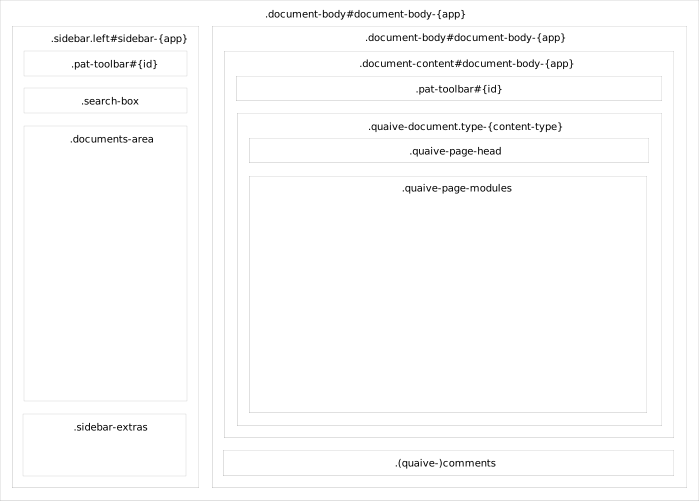
Apps may or may not have a (left) sidebar. Some apps even have a small right sidebar. Since there is, at the time of writing, only one app with a right-hand sidebar, this is left out of scope for now.
Every app has a div with the class content-body. This class is mandatory; an ID is optional but sometimes useful. The IDs of the main parts of the app structure always match the class name, suffixed with the app name — for example: <div class="document-body" id="document-body-contacts">. The document content, if any, also has its own div (.document-content), as does the comment trail.
Whenever an app, or a document within an app, is opened from another app or from a portal page, pat-inject injects the desired content into the destination app and brings it to the front by updating a series of classes via pat-switch, always in a consistent manner. A convenient helper for setting the correct attributes on a trigger element is _includes/open-app.
The afore mentioned structure comes from ‘/layouts/app-frame’.
Patterns
The prototype uses the interaction component library ‘Patterns’. A Pattern can provide HTML/CSS together with JavaScript for an interaction component (the typical case), or JavaScript alone (behavioural patterns such as pat-inject). Pure HTML/CSS Patterns also exist, reflecting the decreasing dependency on JavaScript for interaction components. Examples include pat-button, pat-button-bar, and pat-rich. An example of a component that formerly relied on JavaScript but no longer does is pat-checklist. Several more components are expected to become HTML/CSS only in the near future, including pat-masonry, pat-tooltip, pat-context-menu (which currently uses pat-collapsible), and even pat-carousel. Patterns components are included in a Jekyll prototype via Git submodules. In Quaive they are found here:
- Layouts (markup of screen layouts, such as modals):
/_layouts/patterns - Includes (markup for components):
/_includes/patterns - SASS:
/_sass/libraries/patterns/ - JavaScript bundle (not a submodule):
/assets/main/script/bundle.js